
Party rental software
Party rental software that runs the route, not just the calendar
A party rental business is a delivery business on weekends. The calendar holds the bookings. The trailer, the crew and the clock decide whether they go well.
PartyPad keeps both in one place. Orders, inventory and customers on one side. Stops, drivers and completion times on the other.
The demo is a real workspace with sample bookings. No signup, no card.
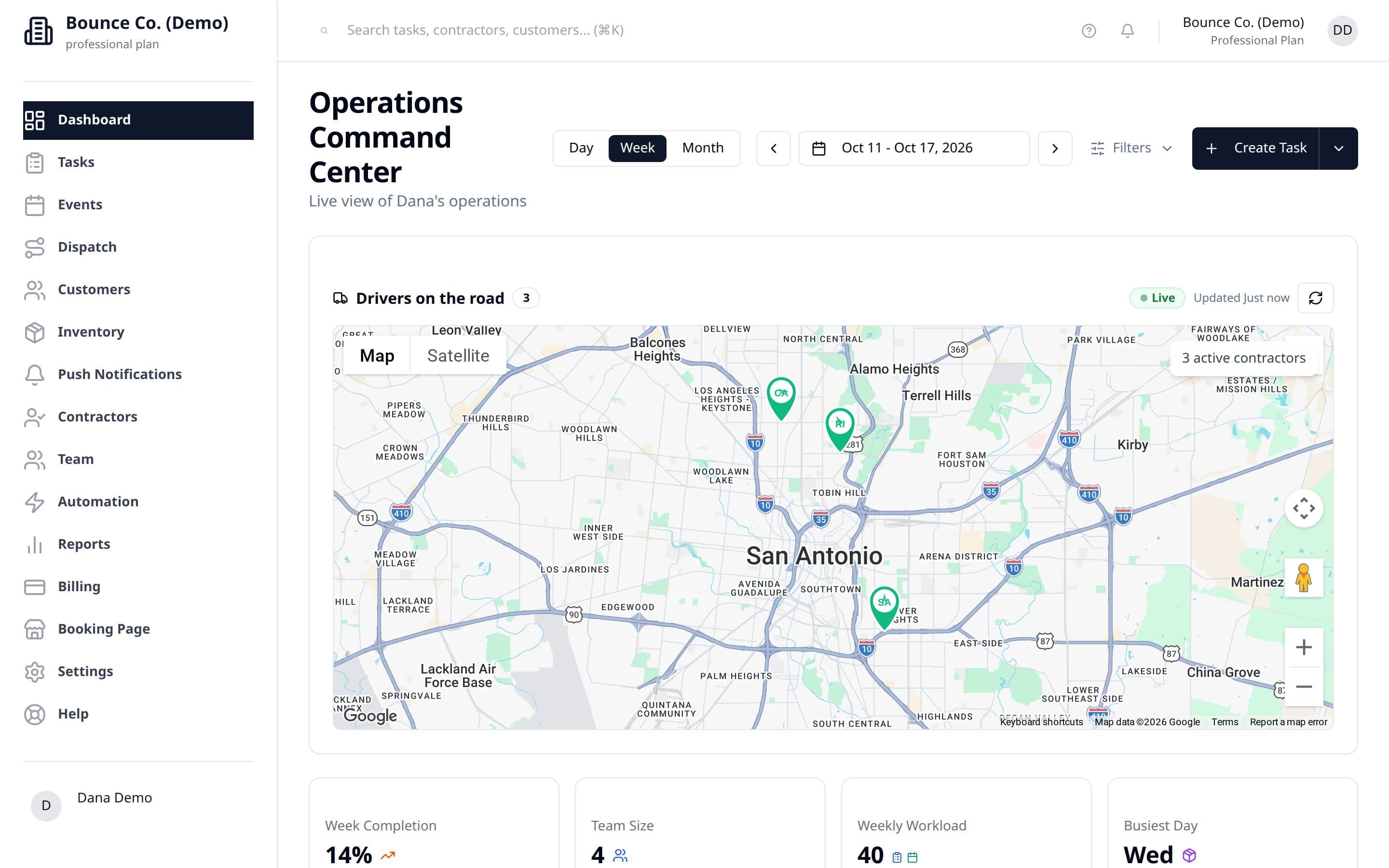
One system from booking to pickup
Orders and customers
One record per customer, and it holds the history. Every order carries its rentals, delivery window and notes for the crew.
Tasks generated from the order
On the paid plan, confirming an order creates its delivery, setup and pickup tasks. Nobody rebuilds the day from the calendar.
A live map of the crew
See where each crew is while the route is running. A late setup shows up before the customer calls about it.
QuickBooks Online sync
On the paid plan, invoices sync to QuickBooks Online so your bookkeeper is not re-typing Saturday on Monday.
Questions operators ask
- Does PartyPad take a cut of my bookings?
- No. There is no commission on your bookings on any plan. Online payments go straight to your own Stripe or Square account, and they charge their normal processing fee.
- Is there a free plan?
- Yes. The free plan covers up to 25 team members with unlimited scheduling, and it does not expire. The paid plan adds QuickBooks Online sync, automation templates, reports and an unlimited team.
- Is pricing based on how many units I own?
- No. No PartyPad plan limits how many inflatables or items you can list. Plans differ by team size and features, not by the size of your inventory.
- Can I try it before I set anything up?
- Yes. The live demo is a real workspace with sample bookings and crews on the map. No signup and no card. It resets every night.
Related reading
- Inflatable Office vs PartyPad: QuickBooks Compared
How Inflatable Office and PartyPad handle QuickBooks, from each vendor's own pages, checked October 14, 2026. Including where Inflatable Office does more.
- Switching from Event Rental Systems to PartyPad: A Checklist
The order to move from ERS to PartyPad without dropping a booking: inventory, customers, upcoming orders, crew, then the booking page.
- Moving Your Customers from Event Rental Systems to PartyPad
How to get your customers out of ERS and into PartyPad: the file it takes, the columns, and what does not carry over.
- Switching from Inflatable Office to PartyPad: A Checklist
The order to move from Inflatable Office to PartyPad without dropping a booking: inventory, customers, upcoming orders, crew, then the booking page.
- Moving Your Customers from Inflatable Office to PartyPad
How to get your customers out of Inflatable Office and into PartyPad: the file it takes, the columns, and what does not carry over.
- Inflatable Office vs ERS vs PartyPad: Pricing Compared (2026)
Three ways to charge for party rental software: by item count, by feature tier, or by team size. Each vendor's published plans and fees, side by side and dated.
Related: Inflatable rentals · PartyPad Crew · Compare rental software
Then go home.